
How to Make a Small Business Video Without a Production Crew
Plan a practical small business video without a crew: choose one message, use available footage and build a repeatable slide-by-slide story.
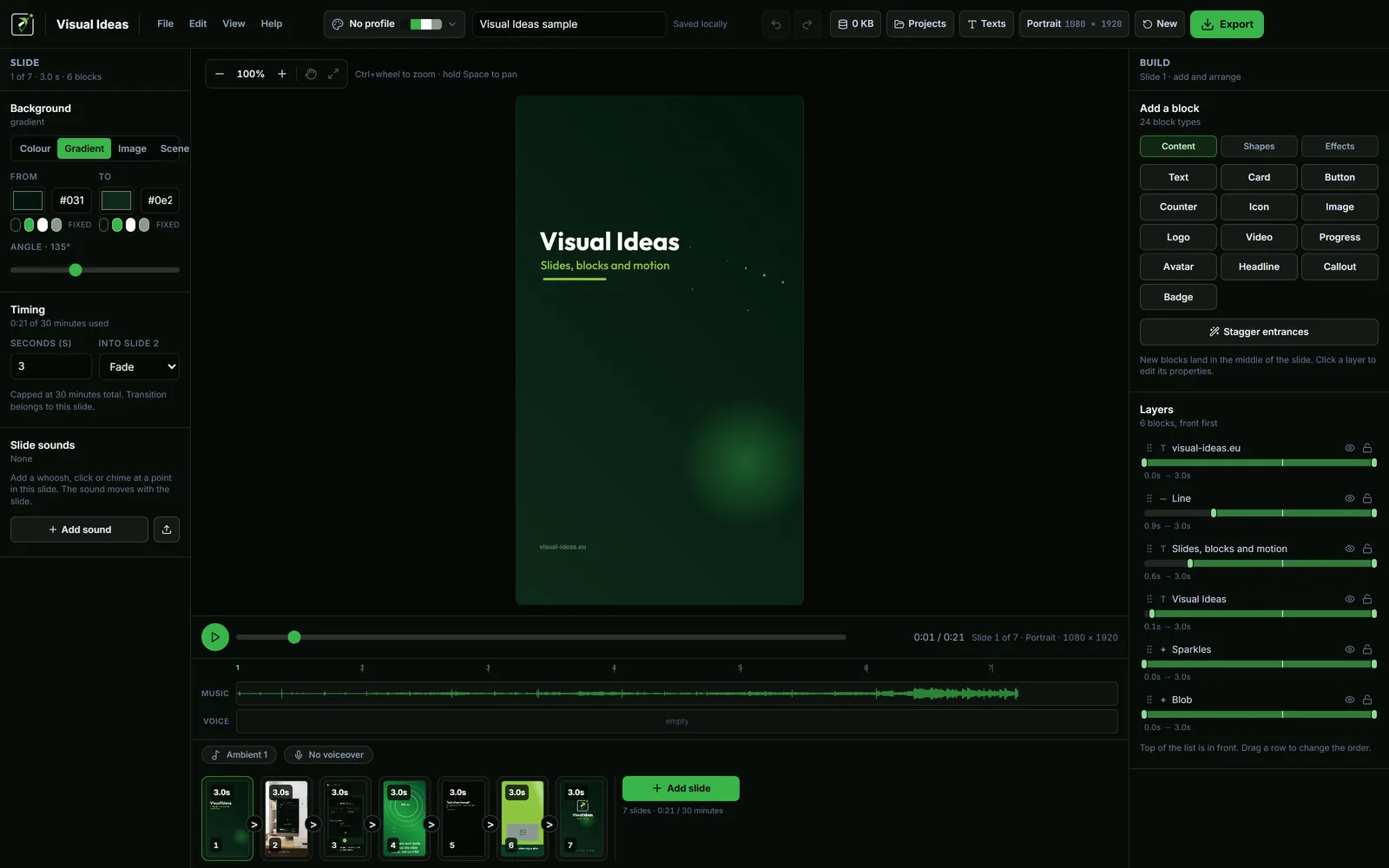
A production crew is not what makes a small business video useful. A clear message and a repeatable layout are. The camera you already own and the photos already on your phone are usually enough.
This is a practical routine for making one video this week without hiring anyone, blocking a studio or learning a timeline editor.
Pick one message from the work you already do
The best source of video ideas is the questions customers ask. Write down the five questions you answer most often. Pick the one that saves you the most time when it is answered well.
That question becomes the video's subject. The message is the short answer, in the customer's words. "Yes, we deliver within 20 km on Thursdays" is a message. "We are passionate about service" is not.
One video answers one question. If you try to answer three, the viewer remembers none of them.
Gather what you already have
Before shooting anything, look through your phone and your computer:
- Product photos that are already in focus.
- A short clip of the work in progress.
- A photo of the team or the shop.
- The logo file and the brand colours.
A video built from five good existing photos is usually better than one built from a rushed recording with bad light. If you need a new shot, take it in daylight near a window and keep the background simple.
Do not use a customer's face, home or private information without permission. Keep a folder of cleared media and note where each file came from.
Use one layout for every video
A small business does not need a new design for every post. Build one layout and reuse it:
- Title slide — the question or the offer.
- Photo slide — one image with a short caption.
- Detail slide — the fact that matters: price, hours, area, time.
- Closing slide — the name, the logo and one instruction.
Visual Ideas makes this practical because a project is a set of slides with text, pictures and timing, not a multi-track timeline. Duplicate the project folder, swap the photo and the caption, and export.
Set the brand colours and logo once as a brand profile. Every new project can copy them in one step.
Write the words before adding effects
A small business video does not need animation to be watchable. It needs text that can be read and a photo that can be seen. Write the captions first, then decide whether an entrance or a transition helps.
Keep the main line to one short sentence. Put the detail — address, hours, price — in a second line or a separate slide. If the viewer has to read a paragraph, the video has become a leaflet.
For a phone-first audience, use large type and strong contrast. The readable Reels text guide applies to a shop update just as much as to a creator's Reel.
Choose the shape for where customers are
Portrait for Reels, TikTok and Shorts. Landscape for a website, a YouTube video or a screen in the shop. Square or 3:4 when the same file has to work in a feed and on a page.
The decision changes the layout. A portrait frame has room for one photo and one line; a landscape frame can show the shop and the text side by side. Decide before you place the blocks.
If you need both, make the portrait version first. The narrower frame forces you to choose the one thing that matters, and the landscape version can then give the extra width to the photo.
Add sound only if it helps
A shop update can be silent. A before-and-after can use a quiet ambient track. A video with a voiceover needs a clear recording and ducked music.
Visual Ideas ships with two ambient tracks, a small CC0 sound library and one voiceover track per project. It does not record audio; record the voice on your phone or computer and upload the file. The music and voiceover guide covers the mix.
Do not add music just because video has music. A silent clip autoplays without surprising anyone in a waiting room or an office.
Review on a phone before you post
Watch the exported MP4 on the phone your customers use. Check:
- Can you read the main line without squinting?
- Is the photo clear at that size?
- Are the hours, price or address correct?
- Does the closing frame say what to do next?
A wrong opening time is worse than no video. Check dates and prices twice.
Make the next one in ten minutes
The first video takes the longest because you are building the layout. The second one should reuse it. Keep the project folder, swap the photo, change the caption, export.
That is the whole system: one message, existing media, one layout, one export. It does not need a crew, a studio or a subscription.
If you want seven ready-made formats to rotate through, seven short video ideas for small businesses gives each one a slide shape and the single fact it needs.

Cristian Istrate
Independent developer behind Visual Ideas, a video editor for Windows. I write these notes when a problem keeps coming back in support email. Get in touch.