
Export for social media
One project, the right file for each feed.
The last step is the one that decides whether the video looks right where it will be watched. A portrait video posted to a landscape feed is cropped or letterboxed; a landscape video posted to Reels is mostly empty space.
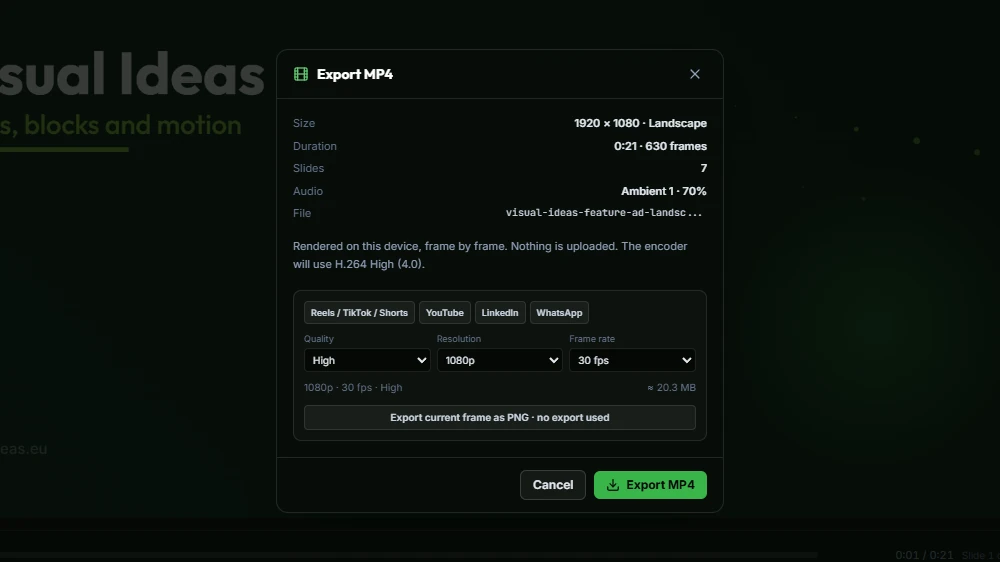
Visual Ideas exports a standard MP4 in the project’s frame shape, with the audio mixed in. You choose portrait or landscape when you start the project, so the composition is built for the feed rather than adjusted afterwards; the export sheet then picks the resolution, frame rate and a platform preset.
The two frame sizes
Portrait is 1080 by 1920: Reels, TikTok, Shorts, Instagram Stories and most phone-first feeds. Landscape is 1920 by 1080: YouTube, LinkedIn, a website header, a presentation.
Both are built from the same blocks and the same animation. Only the composition changes, which is why the app asks for the size up front instead of stretching one layout into the other.
- MP4 with H.264 video and AAC audio — accepted by every major platform
- 1080p or 720p, at 30, 25 or 24 frames per second
- Presets for Reels/TikTok/Shorts, YouTube, LinkedIn and WhatsApp
- Background export: keep editing while it renders
- Export the current frame as a PNG, which never uses an export
- No watermark on any export
What “free” means here
The app is free and includes 10 saved exports per local calendar month. An export only counts once the MP4 has been written to the path you chose, so a cancelled or failed export uses nothing. If you need more in a month, packs of 10, 25 and 100 exports can be bought once inside the app; the credits never expire, and the free allowance is used first.
The export runs on your PC. Nothing is uploaded to render, the file is written where you choose, and a project can run up to 30 minutes.
Getting a clean file
Check three things before exporting. First, the frame size matches the platform. Second, every text block has been on screen long enough to read. Third, the audio is not clipping — a track at full volume plus a voiceover often is.
Export once, then watch the file on a phone. A laptop screen flatters small text; a phone tells you the truth.
How to use it
- 1
Finish the slides and play the video from the start once.
- 2
Open Export and pick a preset: Reels/TikTok/Shorts, YouTube, LinkedIn or WhatsApp.
- 3
Adjust the quality, resolution (1080p or 720p) and frame rate if the preset is not right.
- 4
Start the export; it can continue in the background while you keep editing.
- 5
Watch the saved MP4 on a phone at normal size before you upload it.
Get Visual Ideas for Windows
Free with 10 exports a calendar month, no account, and nothing leaves your PC. Larger export packs are bought once in the app and never expire.