
Free templates

Start from a scene that is already timed and balanced.

Complete scenes, saved as Visual Ideas projects. Download one, unzip it, open the folder in the app and change the words, the pictures and the timing. Everything is editable: there are no locked layers and no missing files.

They are free to use in your own videos, personal or commercial. The pictures inside were generated with OpenAI and Google tools and then edited here, so they can go straight into a client video.

Auto Repair template: a checklist of services with red checks over a workshop photo, a mechanic on the left and a TODAY button.
Local service1920 × 1080 · 18 seconds · 2 slides

Auto Repair

A garage promo: the shop name, a checklist of services with round checks, and a TODAY button over one workshop picture.

  • Eight lines of text, so the name, the checklist and the call to action are edited row by row.
  • A workshop background and a cut-out mechanic, each replaced on its own layer.
  • A white panel with a TODAY button, timed to land after the checklist.
Download project

ZIP · 2.8 MB · README and licence inside

Fashion template: a gold script "New Season" over a model in sunglasses, a 30% off badge and a shop now button on a purple background.
Retail1920 × 1080 · 18 seconds · 2 slides

Fashion

A collection drop: a gold script headline over a model, a painted "30% off" badge and a shop-now button, with a slow burst turning behind it.

  • Two photographs plus a painted stroke behind the sale badge, each on its own layer.
  • A radial burst turns slowly behind the layout for the whole 15 seconds.
  • A gold script headline and a shop-now outline button.
Download project

ZIP · 2.9 MB · README and licence inside

Plumbing Services template: a blue gradient panel with four check-marked services, a yellow "For a free estimate" button and a plumber photo.
Local service1920 × 1080 · 18 seconds · 2 slides

Plumbing Services

A trade landing clip: a blue gradient panel, four check-marked service rows and a yellow "For a free estimate" button.

  • A gradient panel and a yellow highlight bar behind the word "Services".
  • Three pictures — the plumber, a water splash and a toolbox — each swappable on its own.
  • Four check-marked service rows and a "Call today" line above the estimate button.
Download project

ZIP · 3.7 MB · README and licence inside

Auto Repair template: a checklist of services with red checks over a workshop photo, a mechanic on the left and a TODAY button.
Local service1080 × 1080 · 18 seconds · 2 slides

Auto Repair

A garage promo: the shop name, a checklist of services with round checks, and a TODAY button over one workshop picture.

  • Eight lines of text, so the name, the checklist and the call to action are edited row by row.
  • A workshop background and a cut-out mechanic, each replaced on its own layer.
  • A white panel with a TODAY button, timed to land after the checklist.
Download project

ZIP · 2.8 MB · README and licence inside

Auto Repair template: a checklist of services with red checks over a workshop photo, a mechanic on the left and a TODAY button.
Local service1080 × 1920 · 18 seconds · 2 slides

Auto Repair

A garage promo: the shop name, a checklist of services with round checks, and a TODAY button over one workshop picture.

  • Eight lines of text, so the name, the checklist and the call to action are edited row by row.
  • A workshop background and a cut-out mechanic, each replaced on its own layer.
  • A white panel with a TODAY button, timed to land after the checklist.
Download project

ZIP · 2.8 MB · README and licence inside

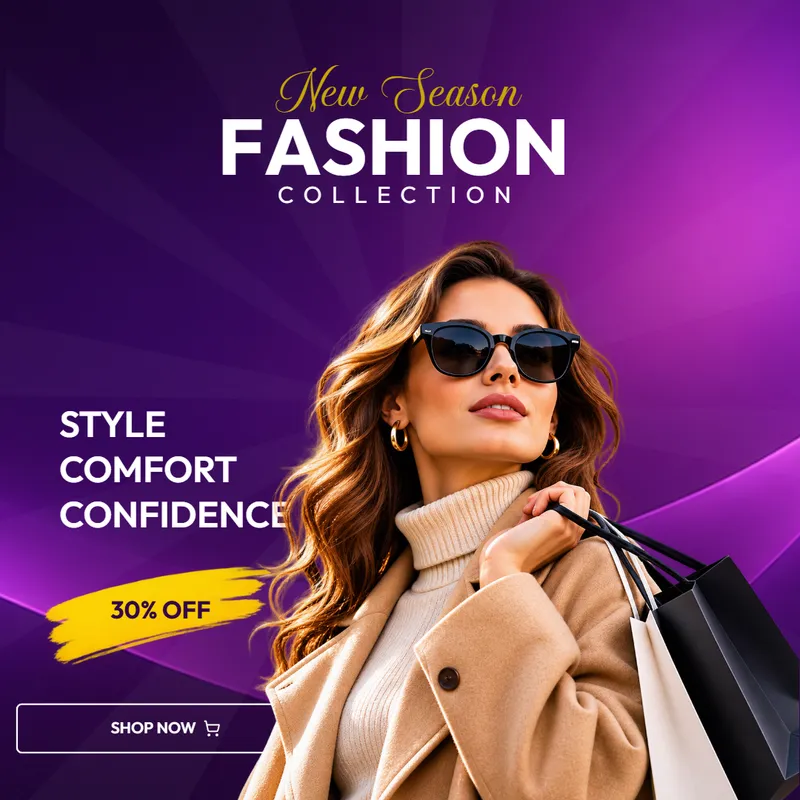
Fashion template: a gold script "New Season" over a model in sunglasses, a 30% off badge and a shop now button on a purple background.
Retail1080 × 1080 · 18 seconds · 2 slides

Fashion

A collection drop: a gold script headline over a model, a painted "30% off" badge and a shop-now button, with a slow burst turning behind it.

  • Two photographs plus a painted stroke behind the sale badge, each on its own layer.
  • A radial burst turns slowly behind the layout for the whole 15 seconds.
  • A gold script headline and a shop-now outline button.
Download project

ZIP · 2.9 MB · README and licence inside

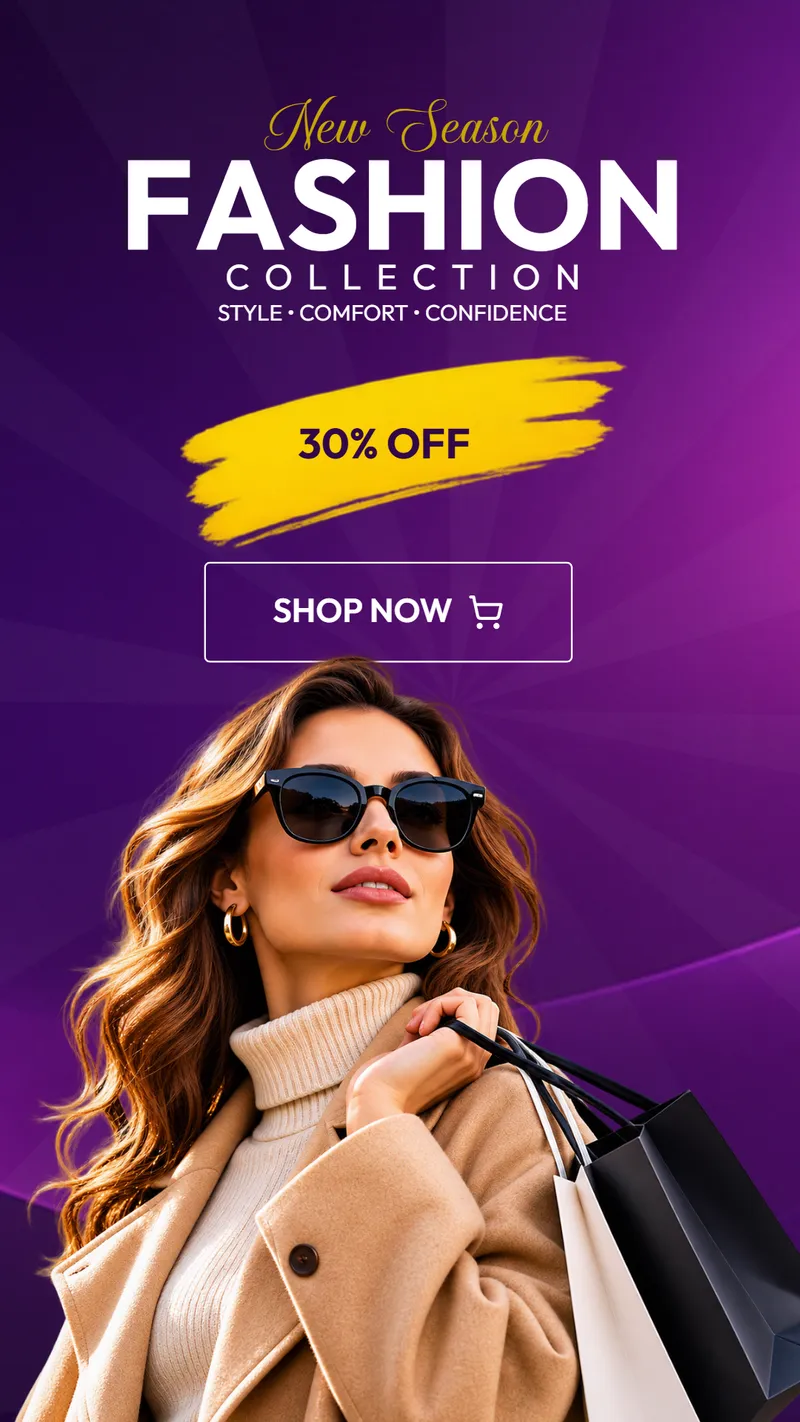
Fashion template: a gold script "New Season" over a model in sunglasses, a 30% off badge and a shop now button on a purple background.
Retail1080 × 1920 · 18 seconds · 2 slides

Fashion

A collection drop: a gold script headline over a model, a painted "30% off" badge and a shop-now button, with a slow burst turning behind it.

  • Two photographs plus a painted stroke behind the sale badge, each on its own layer.
  • A radial burst turns slowly behind the layout for the whole 15 seconds.
  • A gold script headline and a shop-now outline button.
Download project

ZIP · 2.9 MB · README and licence inside

Plumbing Services template: a blue gradient panel with four check-marked services, a yellow "For a free estimate" button and a plumber photo.
Local service1080 × 1080 · 18 seconds · 2 slides

Plumbing Services

A trade landing clip: a blue gradient panel, four check-marked service rows and a yellow "For a free estimate" button.

  • A gradient panel and a yellow highlight bar behind the word "Services".
  • Three pictures — the plumber, a water splash and a toolbox — each swappable on its own.
  • Four check-marked service rows and a "Call today" line above the estimate button.
Download project

ZIP · 3.7 MB · README and licence inside

Plumbing Services template: a blue gradient panel with four check-marked services, a yellow "For a free estimate" button and a plumber photo.
Local service1080 × 1920 · 18 seconds · 2 slides

Plumbing Services

A trade landing clip: a blue gradient panel, four check-marked service rows and a yellow "For a free estimate" button.

  • A gradient panel and a yellow highlight bar behind the word "Services".
  • Three pictures — the plumber, a water splash and a toolbox — each swappable on its own.
  • Four check-marked service rows and a "Call today" line above the estimate button.
Download project

ZIP · 3.7 MB · README and licence inside

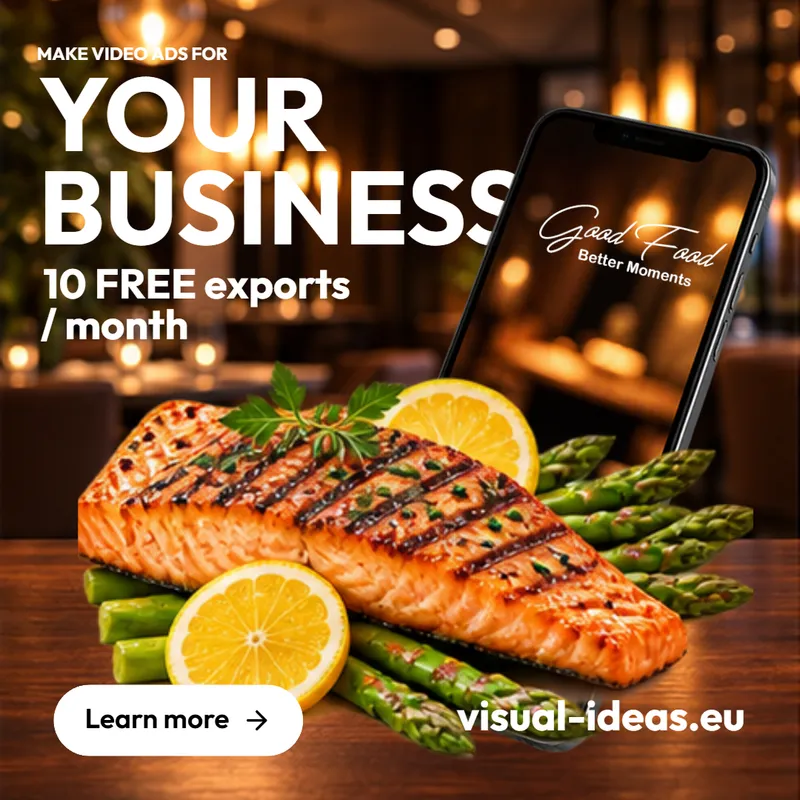
Food Promo template: "Make video ads for your business" over a restaurant dining room, a grilled salmon plate with asparagus in front, a phone showing a Good Food logo and a Learn more button.
Restaurant1080 × 1080 · 15 seconds · 1 slide

Food Promo

A square restaurant promo: a warm dining-room shot behind the headline, then pasta, a burger, salmon and a latte swapping in over it, with a phone mockup and a round Learn more button.

  • A dining-room background with four cut-out food photos — pasta, a burger, salmon and a latte — replacing each other through the 15 seconds.
  • A phone mockup carrying the brand name, on its own layer so it can be swapped for a real screen.
  • A two-part headline, the free-export line and a round Learn more button, edited one block at a time.
Download project

ZIP · 3.2 MB · README and licence inside

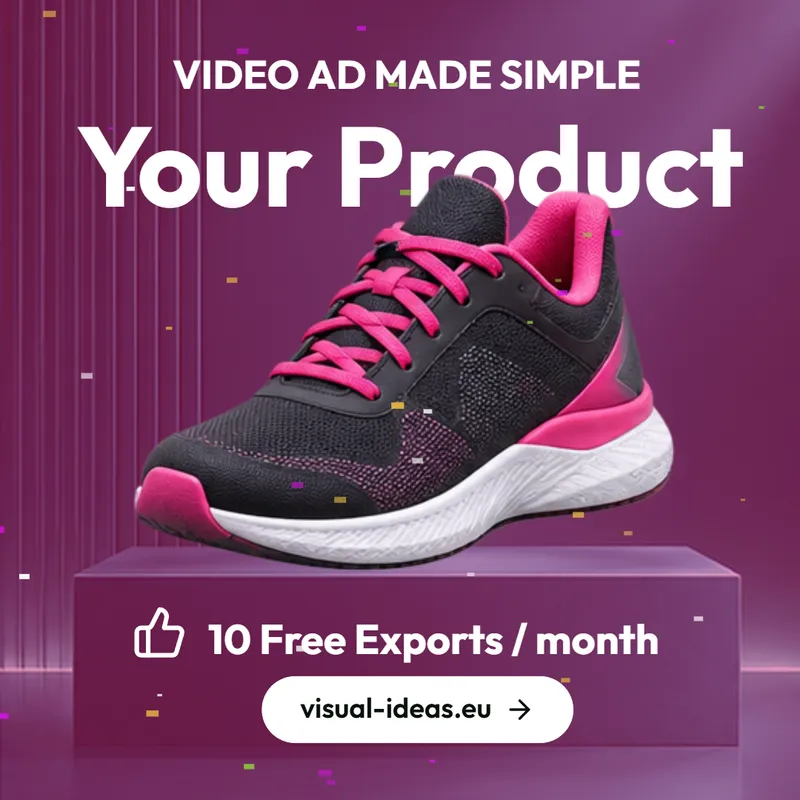
Product Promo template: "Your Product" over a black and pink running shoe on a purple block, with confetti, "10 Free Exports / month" and a visual-ideas.eu button.
Retail1080 × 1080 · 12 seconds · 1 slide

Product Promo

A product launch square: one product photo on a raised block over a pink-violet backdrop, with confetti, a thumbs-up line and a pill button underneath.

  • The product photo sits on its own layer and floats gently, so a shoe, a bottle or a box can drop straight in.
  • Confetti falls once as the headline pops in, and a soft light sweep crosses the backdrop behind it.
  • A kicker line, the product name, the free-export line and a rounded button, each edited on its own.
Download project

ZIP · 1.0 MB · README and licence inside

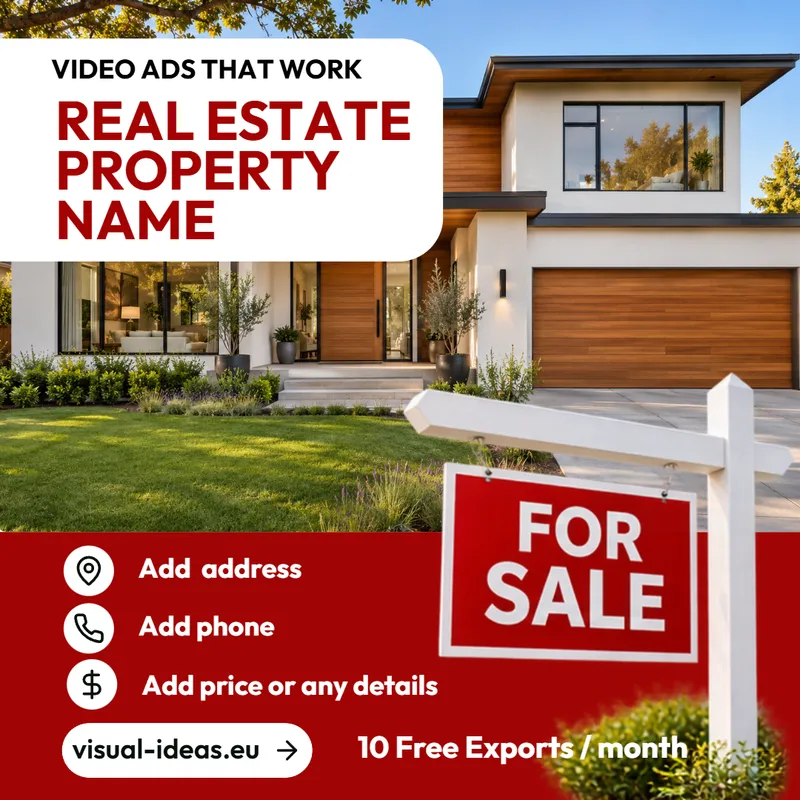
Real Estate template: "Real Estate Property Name" in red on a white panel over a modern house, a FOR SALE sign at the corner, and a red band with address, phone and price rows.
Real estate1080 × 1080 · 8 seconds · 1 slide

Real Estate

A property listing square: a white panel with the property name over a house photo, a FOR SALE sign in the corner, and a red band of address, phone and price rows.

  • The house photo fills the top two thirds and the FOR SALE sign is a separate image that pulses in front of it.
  • Three icon rows — location, phone, dollar — with placeholder lines for the address, the phone number and the price.
  • A red footer band carrying the site button and the free-export line.
Download project

ZIP · 2.8 MB · README and licence inside

How to open a template

  1. 1

    Unzip the download

    Windows extracts it to a folder with the template name. Keep project.json and the assets folder together: the project reads its pictures from there.

  2. 2

    Open the project folder

    In Visual Ideas, click Open project on the start screen, press Ctrl+O, or use File → Open project… and pick the folder that holds project.json.

  3. 3

    Change the words and the pictures

    Everything is editable: text, colours, pictures, timing and animation. The palette and the project logo in the Project panel recolour every block that uses a token.

  4. 4

    Export

    When it looks right, export an MP4. The free allowance covers 10 saved exports a calendar month, and this download does not use one.

What is in the download

  • project.json — the whole project: slides, blocks, timing and animation.
  • assets/ — the pictures, at their original resolution.
  • README.txt and LICENCE.txt — how to open it, and what you may do with it.

No font files and no audio files are in the zip. Music comes from the app’s own tracks, and every text uses a bundled font unless the note below says otherwise.

Licence, in short

  • Use a template, and anything you make with it, for personal or commercial work.
  • Change it as much as you like, for yourself or for a client.
  • Do not resell or redistribute the project files themselves as a template or asset pack.
  • The pictures were generated with OpenAI and Google tools and then edited here; their terms allow commercial use of what those tools generate.

The full text travels in every download as LICENCE.txt.

Fashion uses a font you have to install

Fortalesia: a display script by Mans Greback, sold for personal use only. Buy the commercial licence for the headline, or change that text to Outfit, which ships with the app. Buy a licence. Until then, Windows draws the text in the system font, so the headline will not match the poster.

Fashion uses a font you have to install

Fortalesia: a display script by Mans Greback, sold for personal use only. Buy the commercial licence for the headline, or change that text to Outfit, which ships with the app. Buy a licence. Until then, Windows draws the text in the system font, so the headline will not match the poster.

Fashion uses a font you have to install

Fortalesia: a display script by Mans Greback, sold for personal use only. Buy the commercial licence for the headline, or change that text to Outfit, which ships with the app. Buy a licence. Until then, Windows draws the text in the system font, so the headline will not match the poster.

Want the next one by email?

The downloads above are free and need no address. If you would rather be told when a new template is ready, leave an email here: I send one message when there is something new, never a newsletter, and replying “stop” removes you.

One email when a template is published. The address is not used for anything else and is not added to an automatic mailing list. See privacy.

Every template is opened in Visual Ideas

The app reads the project folder directly — no account, no upload, nothing sent to a server. Free with 10 exports a calendar month, and larger export packs are bought once in the app.