How to Save Time Managing Multiple Facebook Pages
Managing a single active Facebook page is a significant commitment. Managing three, five, or twenty? That is a logistical mountain.
Whether you are a social media manager at an agency handling a roster of clients, or an entrepreneur overseeing several distinct brands, the complexity doesn't just add up—it multiplies. Constant tab-switching, juggling different brand voices, and tracking a dozen different comment sections can quickly drain hours from your day.
If you are drowning in notifications and struggling to keep your campaigns straight, it’s time to rethink your workflow. Here is how to efficiently manage multiple Facebook pages without losing your mind.
1. Stop Tab-Switching and Consolidate
The biggest thief of time in multi-page management is the native interface itself. Logging in and out, switching accounts, and navigating the clunky Meta Business Suite to find the right page creates massive friction.
The Fix: You need a centralized command center. By using a unified dashboard, you securely connect all your managed pages in one place. This allows you to view timelines, schedule posts, and cross-reference campaigns without ever having to switch tabs or remember who you are currently logged in as. Consolidation is the cornerstone of scaling.
2. Implement a Tagging and Naming Convention
When you manage dozens of assets, graphics, and copy drafts, a disorganized file system will paralyze you.
Create a rigid, standardized naming convention for all content before it goes into your scheduling queue. For example: `[ClientName]_[Platform]_[Date]_[Topic]` -> `BakeryCo_FB_Oct12_NewMenu`
Use a single cloud drive system with a dedicated folder for each page. Within those folders, organize by month. When it is time to schedule, you won't waste ten minutes searching your downloads folder for the right graphic.
3. Batch by Client, Not by Task
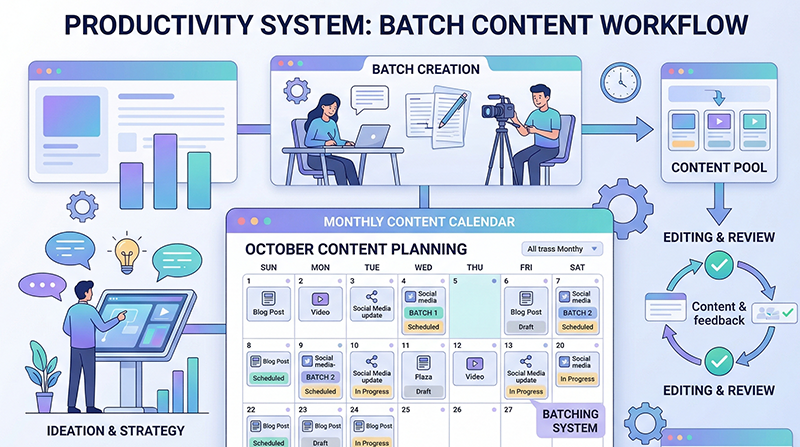
A major mistake managers make is task-batching across different brands. For instance, they will try to write Monday's post for Client A, Client B, and Client C back-to-back.
This causes terrible "context switching" fatigue. Every brand has a different voice, audience, and goal. Switching from a playful local cafe’s voice to a serious B2B law firm’s voice in the span of five minutes is exhausting.
The Fix: Batch your work by page. Sit down and do all of Client A’s content creation, scheduling, and community management for the week. Completely finish Client A before you allow yourself to even look at Client B's profile.
4. Leverage Global Templates
While every page needs unique content, the structures of the posts are often identical.
Create a personal swipe file or template library. If you find a structure that works incredibly well for asking a question on a real-estate page, save the framework. The next time you need to ask a question on an entirely different e-commerce page, pull the template and simply adjust the variables. You do not need to reinvent the structural wheel for every single post.
5. Ditch Manual Approval Chains
If you manage pages for clients or a larger team, waiting for post approvals via email or Slack is a massive bottleneck.
"Did the client approve the image for Tuesday? Which version of the copy are we using?"
To scale gracefully, you need a workflow where clients or stakeholders can review content cleanly within your system. While evaluating the pricing of different management tools, prioritize features that clearly show draft statuses to avoid endless email chains.
6. Audit and Prune
Finally, take time quarterly to audit the pages you manage. Sometimes we hold onto outdated workflows out of habit.
Are there redundant steps in your creation process? Are you spending an hour making custom graphics when simple text posts are actually driving more engagement for a specific brand? Work smarter, not just harder. For more tips on streamlining your agency workflow, dive into the guides available on our insights.
Managing multiple pages shouldn't feel like spinning plates. By consolidating your tools, batching by brand, and standardizing your assets, you can significantly scale your capacity while actually working fewer hours.
---
INTERNAL LINKS USED: - / (home page for unified dashboard solution) - /pricing (reference for evaluating management tools) - /insights (reference for agency workflow guides)
IMAGE SUGGESTIONS: - Placement: After "1. Stop Tab-Switching and Consolidate" Description: A visual comparison showcasing a chaotic browser window with 20 open Facebook tabs versus a clean, unified dashboard featuring multiple brand logos clearly organized in a sidebar. - Placement: Under "3. Batch by Client, Not by Task" Description: An infographic showing the concept of "context switching" brain drain vs a streamlined focusing graphic representing single-client focus.
CTA: Ready to stop juggling tabs and start scaling your management? Manage all your Facebook pages from one powerful, unified scheduler. Try it today and win back your week.